
LLMs (large language models) have taken off over the past year. At the same time, Rust has risen in popularity due to its efficiency and developer experience. In this guide, we’ll explore the possibilities of combining these two technologies to get a glimpse of what AI-powered applications could look like in the future.
How exactly does these LLM powered chatbots works?
Most chatbots today are built on a framework called RAG (Retrieval-Augmented Generation). This allows LLMs to refer to relevant content before answering a question, making their answers more accurate. As an example, if asked “How far is the sun?” most of us wouldn’t know offhand. But with a quick Google search, we could find a precise answer. RAG lets LLMs do the same thing.
Any RAG implementation has 3 key components:
- LLM: The large language model that analyses text and generates responses.
- Knowledge base: A special database holding “embeddings”, vector representations of data that encode semantic meaning.
- Context engine: Code that interfaces between the LLM and database.
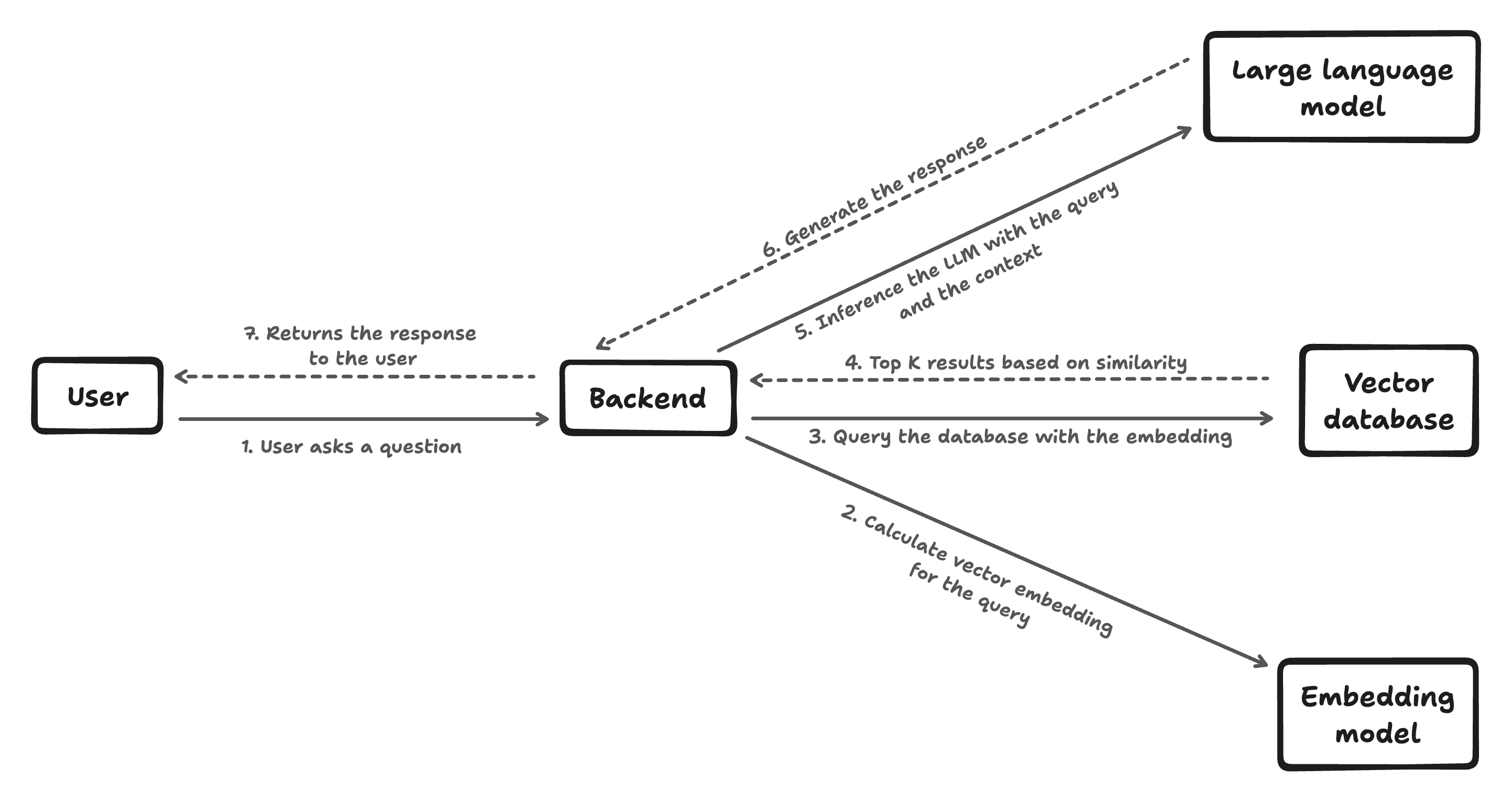
The above picture shows how the end-to-end data path of a RAG flow works. When a user enters a query, we encodes it into an “embedding vector” that captures its underlying semantic meaning. This is done using a pre-trained language model. While the vector itself would look like nonsense to a human, it allows the machine learning model to represent the query’s “essence” in a way it can match against other data.
Similarly, embeddings can be pre-generated for all the source documents and store it in the Knowledge base (vector database). When a new user question comes in, similarity algorithms like cosine similarity compare the question embedding to the document embeddings to find documents that are relevant to the question.
After retrieving some potentially relevant documents, the original user question and the documents are passed to the LLM. The LLM is trained to read the documents and incorporate relevant context from them when formulating an answer. This allows it to tailor the response specifically to the retrieved information, rather than just answering from its own knowledge, leading for more accurate answer.
How can we build one of our own?

Now that we understand the gist of using RAG to develop a custom knowledge-powered chatbot, let’s plan to build one of our own in Rust!
Selecting a Model
First, we need an LLM to analyze text and generate responses. The current go-to is OpenAI’s GPT-3, but it’s pricey and requires sending data externally. Luckily, open source models like Mistral-7b and Phi-2 are free to run locally. It’s not as advanced as GPT-3/4 but can still get the job done! For this tutorial, we’ll use the lightweight Phi 2 model that runs on most consumer hardware.
Setting Up a Knowledge Base
There are a number of databases specifically made for storing vector embeddings. But for this tutorial, I will be using SurrealDB due to its “embedded mode” in Rust, which removes the need to spin up a separate instance. So this essentially works as an SQLite database but with a lot more features on top of it.
Creating a Context Engine in Rust
We’ll use Rust to interface between the user, database, and LLM. As an efficient systems programming language that can compile into standalone binaries, Rust makes distribution to end users simpler compared to languages like Python. This has contributed to growing machine learning ecosystem around Rust. As an example, OpenAI’s tokenizer and vector database Qdrant powering both X’s Grok and OpenAI’s API were written on Rust. HuggingFace is also investing heavily in its Candle ML framework for Rust, which we will leverage in this tutorial.
Let’s start coding, shall we?
Setting up the user interface
In this tutorial, we’ll create a simple CLI where users can ask our chatbot to remember facts and later ask it questions. To handle user input, we’ll use a handy Rust library called Clap. It makes building CLI apps easy. Here’s how we’ll set up our interface:
// File - cli.rs

use clap::{Parser, Subcommand};

#[derive(Debug, Parser)]
#[command(name = "Tera")]
#[command(about = "Tera is AI assistant which is tailored just for you", long_about = None)]
pub struct Cli {
    #[command(subcommand)]
    pub command: Commands,
}

#[derive(Debug, Subcommand)]
pub enum Commands {
    /// Ask a question
    Ask {
        /// The question to ask
        query: String,
    },
    /// Tell Tera something to remember
    Remember {
        /// The content to remember
        content: String,
    },
}
With our CLI interface set up, we’re ready to implement handlers for the two key commands: remembering facts and asking questions.
The “remember” command will allow users to teach our chatbot new facts. The “ask” command will let users quiz the chatbot about what it has learned. Let’s code up these two command handlers.
// main.rs

use clap::Parser;

mod cli;
mod database;
mod embeddings;
mod llm;

#[tokio::main]
async fn main() -> anyhow::Result<()> {
    let args = cli::Cli::parse();

    match args.command {
        cli::Commands::Ask { query } => {
            let context = database::retrieve(&query).await?;
            let answer = llm::answer_with_context(&query, context).await?;
            println!("Answer: {}", answer);
        },
        cli::Commands::Remember { content } => {
            database::insert(&content).await?;
        }
    }

    Ok(())
}
Setting up the Knowledge Base
Now we need to implement the system to store and retrieve related content. For this, we’ll use SurrealDB. First, we’ll initialize the SurrealDB to use RocksDB as the storage engine. This allows SurrealDB to run embedded inside our app.
Then we’ll create a simple data structure to represent each knowledge chunk the user teaches our chatbot. This makes saving and loading easy.
After that, we’ll write two methods:
- An
insert()method to save new facts into the database - A
retrieve()method to retrieve related content using cosine similarity searches
SurrealDB makes it easy to query related content for a given query thanks to its built-in support for performing cosine similarity against data that was inserted before.
// File: database.rs

use anyhow::{Context, Error, Result};
use serde::{Deserialize, Serialize};
use surrealdb::engine::local::{Db, RocksDb};
use surrealdb::sql::{thing, Datetime, Thing, Uuid};
use surrealdb::Surreal;

lazy_static::lazy_static! {
    pub static ref DB: async_once::AsyncOnce<Surreal<Db>> = async_once::AsyncOnce::new(async {
        let db = connect_db().await.expect("Unable to connect to database");
        db
    });
}

async fn connect_db() -> Result<Surreal<Db>, Box<dyn std::error::Error>> {
    let db_path = std::env::current_dir().unwrap().join("db");
    let db = Surreal::new::<RocksDb>(db_path).await?;
    db.use_ns("rag").use_db("content").await?;
    Ok(db)
}

#[derive(Serialize, Deserialize, Debug, Clone)]
pub struct Content {
    pub id: Thing,
    pub content: String,
    pub vector: Vec<f32>,
    pub created_at: Datetime,
}

pub async fn retrieve(query: &str) -> Result<Vec<Content>, Error> {
    let embeddings: Vec<f32> = crate::embeddings::get_embeddings(&query)?.reshape((384,))?.to_vec1()?;
    let db = DB.get().await.clone();
    let mut result = db
        .query("SELECT *, vector::similarity::cosine(vector, $query) AS score FROM vector_index ORDER BY score DESC LIMIT 4")
        .bind(("query", embeddings))
        .await?;
    let vector_indexes: Vec<Content> = result.take(0)?;
    Ok(vector_indexes)
}

pub async fn insert(content: &str) -> Result<Content, Error> {
    let db = DB.get().await.clone();
    let id = Uuid::new_v4().0.to_string().replace("-", "");
    let id = thing(format!("vector_index:{}", id).as_str())?;
    let vector = crate::embeddings::get_embeddings(&content)?.reshape((384,))?.to_vec1()?;
    let vector_index: Content = db
        .create(("vector_index", id.clone()))
        .content(Content {
            id: id.clone(),
            content: content.to_string(),
            vector,
            created_at: Datetime::default(),
        })
        .await?
        .context("Unable to insert vector index")?;
    Ok(vector_index)
}
If you look closely at our retrieve() and insert() functions, you’ll notice they call a mysterious get_embeddings() method we haven’t defined yet. This is the key to powering semantic searches.
We’ll implement get_embeddings() using BAAI’s bge-small-en-v1.5 text embedding model. To easily run the inference, we’ll utilize HuggingFace’s Candle ML framework.
Following code first downloads the model from HuggingFace Hub and loads it into memory with the correct configuration. The get_embeddings function then gets a reference to the loaded model and tokenizes the given input so the model can understand it. It then performs a forward pass through the model to get the embeddings. After that, the same function executes normalization on the resulting embedding and returns it to the caller.
// File: embeddings.rs

use anyhow::{Context, Error as E, Result};
use candle_core::{Device, Tensor};
use candle_nn::VarBuilder;
use candle_transformers::models::bert::{BertModel, Config, DTYPE};
use hf_hub::{api::sync::Api, Repo};
use lazy_static::lazy_static;
use tokenizers::{PaddingParams, Tokenizer};

lazy_static! {
    pub static ref AI: (BertModel, Tokenizer) = load_model().expect("Unable to load model");
}

pub fn load_model() -> Result<(BertModel, Tokenizer)> {
    let api = Api::new()?.repo(Repo::model("BAAI/bge-small-en-v1.5".to_string()));
    // Fetching the config, tokenizer and weights files
    let config_filename = api.get("config.json")?;
    let tokenizer_filename = api.get("tokenizer.json")?;
    let weights_filename = api.get("pytorch_model.bin")?;

    let config = std::fs::read_to_string(config_filename)?;
    let config: Config = serde_json::from_str(&config)?;
    let mut tokenizer = Tokenizer::from_file(tokenizer_filename).map_err(E::msg)?;

    let vb = VarBuilder::from_pth(&weights_filename, DTYPE, &Device::Cpu)?;
    let model = BertModel::load(vb, &config)?;

    // Setting the padding strategy for the tokenizer
    if let Some(pp) = tokenizer.get_padding_mut() {
        pp.strategy = tokenizers::PaddingStrategy::BatchLongest
    } else {
        let pp = PaddingParams {
            strategy: tokenizers::PaddingStrategy::BatchLongest,
            ..Default::default()
        };
        tokenizer.with_padding(Some(pp));
    }
    Ok((model, tokenizer))
}

pub fn get_embeddings(sentence: &str) -> Result<Tensor> {
    let (model, tokenizer) = &*AI;

    // Tokenizing the sentence
    let tokens = tokenizer.encode_batch(vec![sentence], true).map_err(E::msg).context("Unable to encode sentence")?;

    // Getting the token ids from the tokens
    let token_ids = tokens
        .iter()
        .map(|tokens| {
            let tokens = tokens.get_ids().to_vec();
            Ok(Tensor::new(tokens.as_slice(), &Device::Cpu)?)
        })
        .collect::<Result<Vec<_>>>().context("Unable to get token ids")?;

    // Stacking the token ids into a tensor
    let token_ids = Tensor::stack(&token_ids, 0).context("Unable to stack token ids")?;
    let token_type_ids = token_ids.zeros_like().context("Unable to get token type ids")?;

    // Getting the embeddings from the model
    let embeddings = model.forward(&token_ids, &token_type_ids).context("Unable to get embeddings")?;

    // Normalizing the embeddings
    let (_n_sentence, n_tokens, _hidden_size) = embeddings.dims3().context("Unable to get embeddings dimensions")?;
    let embeddings = (embeddings.sum(1)? / (n_tokens as f64)).context("Unable to get embeddings sum")?;
    let embeddings = embeddings.broadcast_div(&embeddings.sqr()?.sum_keepdim(1)?.sqrt()?).context("Unable to get embeddings broadcast div")?;

    Ok(embeddings)
}
And there we have it, a way to converts any text into a representative vector capturing its underlying meaning. Which can be later used for semantic search when answering user questions.
Linking to a Brain

Our chatbot can now remember facts users teach it and find related information when asked questions later. But coming up with intelligent answers requires more than just search. Our bot needs a brain!
For the brains, we’ll using fine-tuned version of Phi-2, a lightweight yet very capable LLM that was originally trained by Microsoft. This will allow our chatbot to truly understand questions and form thoughtful, helpful answers using its accumulated knowledge. Let’s plug Phi-2 into our system…
// File - llm.rs
// Adopted from https://github.com/huggingface/candle/blob/96f1a28e390fceeaa12b3272c8ac5dcccc8eb5fa/candle-examples/examples/phi/main.rs

use anyhow::{Error as E, Result};
use candle_core::{DType, Device, Tensor};
use candle_transformers::generation::LogitsProcessor;
use candle_transformers::models::quantized_mixformer::Config;
use candle_transformers::models::quantized_mixformer::MixFormerSequentialForCausalLM as QMixFormer;
use hf_hub::{api::sync::Api, Repo};
use lazy_static::lazy_static;
use serde_json::json;
use tokenizers::Tokenizer;
use crate::database::Content;

lazy_static! {
    pub static ref PHI: (QMixFormer, Tokenizer) = load_model().expect("Unable to load model");
}

pub fn load_model() -> Result<(QMixFormer, Tokenizer)> {
    let api = Api::new()?.repo(Repo::model("Demonthos/dolphin-2_6-phi-2-candle".to_string()));
    let tokenizer_filename = api.get("tokenizer.json")?;
    let weights_filename = api.get("model-q4k.gguf")?;

    let tokenizer = Tokenizer::from_file(tokenizer_filename).map_err(E::msg)?;
    let config = Config::v2();
    let vb = candle_transformers::quantized_var_builder::VarBuilder::from_gguf(&weights_filename)?;
    let model = QMixFormer::new_v2(&config, vb)?;

    Ok((model, tokenizer))
}

struct TextGeneration {
    model: QMixFormer,
    device: Device,
    tokenizer: Tokenizer,
    logits_processor: LogitsProcessor,
    repeat_penalty: f32,
    repeat_last_n: usize,
}

impl TextGeneration {
    #[allow(clippy::too_many_arguments)]
    fn new(model: QMixFormer, tokenizer: Tokenizer, seed: u64, temp: Option<f64>, top_p: Option<f64>, repeat_penalty: f32, repeat_last_n: usize, device: &Device) -> Self {
        let logits_processor = LogitsProcessor::new(seed, temp, top_p);
        Self {
            model,
            tokenizer,
            logits_processor,
            repeat_penalty,
            repeat_last_n,
            device: device.clone(),
        }
    }

    fn run(&mut self, prompt: &str, sample_len: usize) -> Result<String> {
        // Encode the prompt into tokens
        let tokens = self.tokenizer.encode(prompt, true).map_err(E::msg)?;
        let mut tokens = tokens.get_ids().to_vec();
        let eos_token = match self.tokenizer.get_vocab(true).get("<|im_end|>") {
            Some(token) => *token,
            None => anyhow::bail!("cannot find the endoftext token"),
        };
        // Loop over the sample length to generate the response
        let mut response = String::new();
        for index in 0..sample_len {
            // Get the context for the current iteration
            let context_size = if index > 0 { 1 } else { tokens.len() };
            let ctxt = &tokens[tokens.len().saturating_sub(context_size)..];
            let input = Tensor::new(ctxt, &self.device)?.unsqueeze(0)?;
            // Run the model forward pass
            let logits = self.model.forward(&input)?;
            let logits = logits.squeeze(0)?.to_dtype(DType::F32)?;
            let start_at = tokens.len().saturating_sub(self.repeat_last_n);
            // Apply the repetition penalty
            let logits = candle_transformers::utils::apply_repeat_penalty(
                &logits,
                self.repeat_penalty,
                &tokens[start_at..],
            )?;

            // Sample the next token
            let next_token = self.logits_processor.sample(&logits)?;
            tokens.push(next_token);
            // Check if the generated token is the endoftext token
            if next_token == eos_token{
                break;
            }
            let token = self.tokenizer.decode(&[next_token], true).map_err(E::msg)?;
            response += &token;
        }
        Ok(response.trim().to_string())
    }
}

pub async fn answer_with_context(query: &str, references: Vec<Content>) -> Result<String> {
    // Create the context for the prompt
    let mut context = Vec::new();
    for reference in references.clone() {
        context.push(json!({"content": reference.content}))
    }
    let context = json!(context).to_string();

    // Create the prompt
    let prompt = format!("<|im_start|>system\nAs a friendly and helpful AI assistant named Tera. Your answer should be very concise and to the point. Do not repeat question or references.<|im_end|>\n<|im_start|>user\nquestion: \"{question}\"\nreferences: \"{context}\"\n<|im_end|>\n<|im_start|>assistant\n", context=context, question=query);

    let (model, tokenizer) = &*PHI;
    let mut pipeline = TextGeneration::new(model.clone(), tokenizer.clone(), 398752958, Some(0.3), None, 1.1, 64, &Device::Cpu);
    let response = pipeline.run(&prompt, 400)?;
    Ok(response)
}
Voila, now you have a fully working chatbot backed by LLM with long term memory, running fully locally.
But does it work?
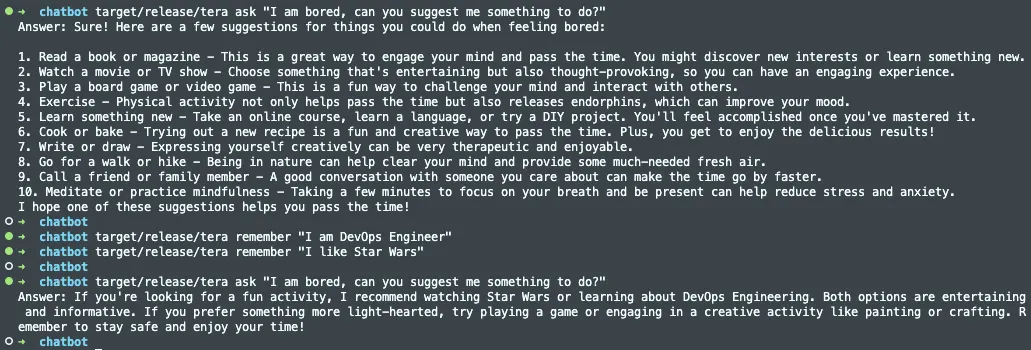
Yes, it does. For a model with only 2.7 million parameters, its performance is amazing. The good thing about this is the more data you feed the database connected to this LLM, the more the responses will get tailored towards you.
What’s Next?
The full source code for this project is available on my GitHub with additional features like uploading PDFs, audio files, and even WhatsApp chats. This chatbot can serve as a customizable local assistant. Feel free to tinker with the code and suggest any improvements! I welcome your ideas for enhancing Tera into an even more capable digital companion. But enough from me. Go explore and have fun seeing what this bot can do!
GitHub Repository: isala404/Tera